 By
By 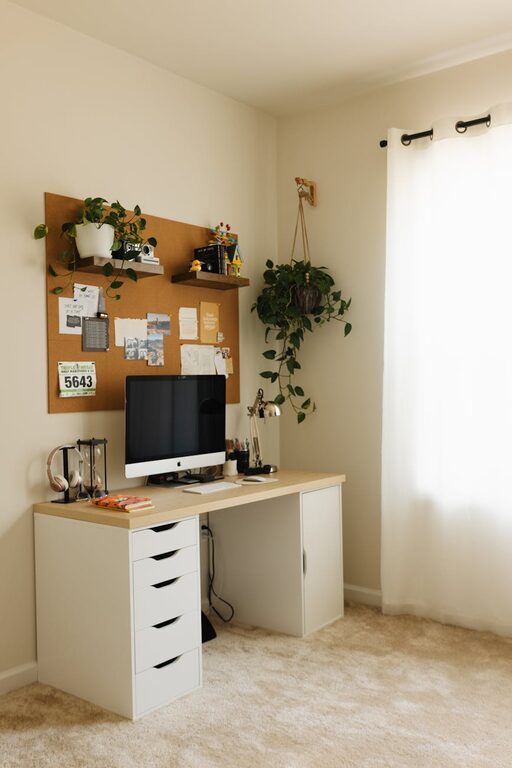
Creating a home workspace that balances comfort with productivity can significantly improve your work-from-home experience. A cozy setup helps you feel relaxed and focused, while a well-organized area keeps distractions at bay. Whether you have a dedicated room or a small corner, these tips will help you craft a workspace that suits your needs.
Choose the Right Location
The foundation of a productive workspace is its location. Here’s what to consider:
– Natural Light: Position your desk near a window if possible. Natural light boosts mood and alertness.
– Quiet Environment: Pick a spot with minimal noise distractions to maintain focus.
– Space Availability: Ensure there is enough room for your tools, storage, and movement.
Invest in Ergonomic Furniture
Comfort is key when working long hours. Ergonomic furniture supports your posture and prevents strain.
– Chair: Select an adjustable chair with good lumbar support.
– Desk: Find a desk at the right height for your body to avoid shoulder and neck discomfort.
– Accessories: Use a footrest or keyboard tray if needed, to maintain proper alignment.
Organize Your Workspace Efficiently
Clutter can distract and reduce productivity. Keeping your workspace tidy encourages focus.
– Storage Solutions: Use shelves, drawers, or organizers to keep supplies within reach but out of the way.
– Cable Management: Use clips or cable boxes to avoid tangled wires.
– Declutter Regularly: Set aside time each week to clean your desk and remove unnecessary items.
Personalize Your Space
Adding personal touches makes your workspace feel inviting and boosts motivation.
– Decor: Include plants, artwork, or photos that inspire you.
– Colors: Use calming or energizing colors depending on your preference.
– Lighting: Supplement natural light with warm desk lamps for a cozy atmosphere.
Optimize Your Technology Setup
Efficient technology helps you work smoothly without frustration.
– Monitor Height: Position your screen at eye level to reduce neck strain.
– Keyboard and Mouse: Choose comfortable devices suited to your hands.
– Internet Connection: Ensure a stable and fast connection to avoid interruptions.
Establish a Routine
Your environment supports good habits, but scheduling your day is equally important.
– Set Work Hours: Define clear start and finish times.
– Breaks: Take short breaks to stretch or relax to maintain productivity.
– Avoid Multitasking: Focus on one task at a time to improve quality of work.
Maintain Good Air Quality
A fresh environment can enhance your concentration and health.
– Ventilation: Open windows regularly or use an air purifier.
– Plants: Indoor plants can improve air quality and add life to your space.
Reduce Noise Distractions
If you cannot control external noises, consider these solutions:
– Noise-Canceling Headphones: Block background noise and help you concentrate.
– White Noise Machines: Provide consistency in sound, masking disturbances.
Keep Hydrated and Nourished
Stay comfortable and alert by:
– Water Bottle: Keep water nearby to remind you to drink throughout the day.
– Healthy Snacks: Avoid heavy meals that can cause sluggishness.
Final Thoughts
Your home workspace should nurture both comfort and efficiency. By thoughtfully selecting the location, furniture, and organization, and by personalizing and optimizing your setup, you create an environment that supports your best work. Remember, creating this space is a process—adjust as needed until it feels just right for you.